Showing posts with label digital citizenship. Show all posts

A Good Digital Citizenship Poster from Edmodo

November 12, 2014
Below is a neat poster from the popular website Edmodo on the best digital citizenship practices. This visual is available for free download in PDF format. Edmodo succinctly outlined the key tips students need to keep in mind while using the digital space. These tips are valid for any kind of online as well as offline activity. The purpose is to teach kids about proper nettiquette and ensure their safety when using the net. Tips such as numbers 2, 3, and 4 are too generic and can apply to all learning environments while tips like number 5 and 6 are related to interactions in virtual spaces. You might want to download the poster and share with your kids and students. here is the download link.

A Good Digital Citizenship Resource and Poster for Teachers

October 21, 2014
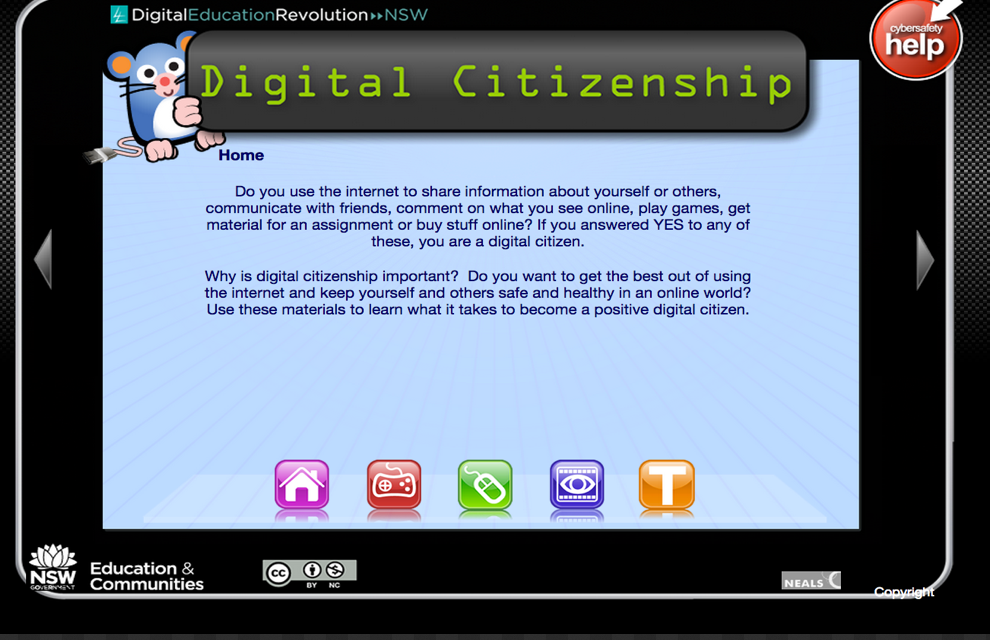
This is a quick post to share with you this interesting find I stumbled upon on my Pinterest feeds. This is a website that features some very important materials and resources on teaching kids and students about digital citizenship. Digital Citizenship resource is prepared and owned by NSW Department of Education and Communities (Australia) and is available for for free but under a Creative Commons Attribution-NonCommercial 3.0 Australia Licence.


The resources you will find in Digital Citizenship are divided into 4 main sections :

1- Games
This section features some games that students can play to enhance their knowledge about cyber safety and digital citizenship. These games are : RUA Cyber Detective, Party Planner, Budd:e Primary, Privacy Pirates, and Privacy Playground.

2- Learning activities
These are some activities to use with students to help them relate the importance of digital citizenship to what they do at school.

3- Video
This section contains several videos on digital citizenship and how to keep yourself and your students safe online.

4- Teachers
" The resources, templates and tools in this section are designed to support schools to implement the Digital Citizenship program. The slideshow and flyer can be customised by schools to suit their needs. The professional learning course familiarises teachers with the materials in this resource and guides them through the process of implementing the program in their school."

NSW has also this wonderful digital citizenship  infgraphic to use with students. Check out the full visual from this link.


Don't Miss These Google Resources and Lesson Plans for Teaching Digital Citizenship

September 25 , 2014
Google Digital Literacy and Citizenship Curriculum is a great resource from Google to help teachers educate their students on the importance of digital citizenship and the different ways and strategies to use to keep themselves safe while using the net. This work is a fruit of a partnership between Google security team and experts from iKeepsafe and it provides some interesting lesson plans that teachers can use in their classrooms. The purpose of these lessons are to :

  • Enable students to think critically 
  • Properly evaluate online sources
  • Help students understand how to protect themselves from online threats ( e.g bullies and scammers).
  • think before they share
  • Be good digital citizens.

Here are the three major featured in this resource:

Class 1: Become an Online Sleuth


In this class, students will identify guidelines for evaluating the credibility of content online.
Students will be able to answer the essential question: Why is it important to be alert and check sources while exploring online?
This class includes pre and post-assessments and several activities for students.

Class 2: Manage your Digital Footprint


Students will be empowered with the information to make safe and appropriate decisions online by learning the importance of online citizenship, how to manage and create a positive reputation online and how to always explore the Internet and other digital communication in a safe manner.
This class is divided into three lessons: Protect Your Stuff, Be Respectful to Yourself and Others, and “Street Smart”.
Each lesson includes pre and post-assessments, guidelines, and several fun activities for students.

Class 3: Identify Tricks and Scams Online


In this lesson, students will learn how to avoid online tricks and scams, and learn best practices of how to conduct themselves online.
Students will be able to answer the essential question: How do I protect myself against online tricks?
This class includes pre and post-assessments, tips on spotting scams, and an activity to reinforce guidelines on avoiding scams and cyber tricks.


 Follow us on : Twitter, Facebook , Google plus, Pinterest .

6 Good Classroom Posters on Digital Citizenhsip

September, 2014
This is a short telegraphic post to share with you this new digital citizenship resource I learned from TechChef4U. Venspired ( a wonderful platform that provides educational posters) has this assorted collection of 6 posters on digital citizenship designed specifically for incorporation in classroom settings. Each of these posters highlight an axiomatic statement that represent the essence of what it means to be a digital citizen. Of course, as Vensdale stated, digital citizenship is not a set of posters to be hang in the classroom walls but is a culture that should be lived by everyone of us. Modelling is an essential component of digital citizenship for it allows students to see in action  the embodiment of the meaning of a digital citizen.

The posters come in different formats which you can access from this link but I would love you to read Venspired introduction annexed to these posters, it's really an excellent read. Enjoy


 Follow us on : Twitter, Facebook , Google plus, Pinterest .

A Good Interactive Poster on Digital Citizenship

August 20, 2014
Here is a new interactive visual featuring different resources for teaching digital citizenship. What I like  about this visual is that it arranges these resources into two sections one for elementary and the other for secondary. Hovering you mouse over each of these sections will enable you to access the different links embedded in it.

Source: Common Sense Media

This interactive visual is created by ThingLink. Check out this guide to learn more about how to create interactive posters such as the one below.


Follow us on : Twitter, Facebook , Google plus, Pinterest .

Classroom Posters and Resources for Teaching Students about Digital Citizenship

August 13, 2014
After posting about the iPad apps you should try in the first week of this new school year and after learning about the 26 questions students should be able to answer during this week, now comes the turn to talk to your students about digital citizenship, a concept of high importance for students overall development as good citizens.

Here are some resources I specifically curated for you to use during the first week of this school year.

What is Digital Citizenship ?

Digital citizenship is : etiquette, access, responsibility, using internet effectively, communication, digital literacy, media literacy, search literacy,critical literacy, social media literacy, respect, privacy, appropriate use, sharing, participation, creation, your internet trail, information literacy.

Watch this wonderful video to learn more about digital citizenship


Why teaching digital citizenship to your students?
  • It is an essential step to becoming media literate in the 21st century
  • It prepares students to navigate the web confidently and safely.
  • Identity theft, sexting, cyberbullying, plagiarism, predators
  • Presnky, 2010: "…installing ethical behaviour… ought to be our number one concern."
  • "students must be 'active, creative, knowledgeable, and ethical participants in our globally networked society." ( U.S.Dept. of Education, 2010).
  • Students learn about the impact of their digital footprints
  • Online misrepresentation can have significant impact
  • It helps students think about the ethical dilemmas that happen online everyday
  • Students are taught skills to deal with potential incidences of cyberbullying
  • It helps students think about their online identities
  • Everything you do online leaves a footprint so choose wisely what you share.
Digital etiquette
  • Only do things online that you would not feel embarrassed telling your parents about. 
  • Be polite towards your digital peers and treat them the way you want would want to be treated. 
  • When citing or using others productions, always make sure you ask for permission and when granted credit them back as the sources of your information. 
  • Participate actively against cuber bullying by reporting to admins instances of potential bullying you would come cross. Only post and share you think have a value if not then don't post. 
  • Embrace difference and know that others might hold opposing views. 
  • Respect them and debate with them civilly If you share personal staff online ( videos, images) make sure it's only with people close to you and can trust fully.

Digital citizenship posters to use in your class

1- Free Classroom Poster on Digital Citizenship


2- Internet Safety


3- Digital Citizenship poster for young kids


4- Do's and Don'ts of Digital Citizenship


10 Great Digital Citizenship Lessons from Google

July 15, 2014
Digital citizenship has a central place in  teaching curricula.It is through educating kids on the appropriate ways to use, navigate, interact,create and share web content that they develop the skills necessary for thriving in a knowledge economy. I have already share here a wide variety of resources on this topic but today I want to draw your attention to these excellent resources from Google.
These are 10 interactive lessons designed by the folks in Google to help students learn more about different themes related to the general topic of digital citizenship. And while all these lessons revolve around YouTube, most of the principles they include could also be projected on any other digital platform.


THINK before you by ToGa Wanderings, on Flickr

Using these lessons, teachers and students will be able to gain useful skills and a holistic understanding about responsible digital citizenship, not only on YouTube, but in all online activity.

Below is a list of lessons, and the recommended flow for delivery. Lessons are designed to fit within 50 minute classes, but can be adapted to fit your schedule:

1- What Makes YouTube Unique
What Makes YouTube Unique - basic facts and figures (40 minutes) - Teacher’s Guide, Slides

Lesson objective: Understand the environment and scale of YouTube

2- Detecting Lies 
Detecting Lies - (35 minutes) - Teacher’s Guide, Slides
Lesson objective: Develop skills of critical analysis when encountering online content

3- Safety Mode
Safety Mode - (5 minutes) - Teacher’s Guide, Slides

Lesson objective : Become familiar with what safety mode is, why you should use it and how to enable it for you and your family.

4- Online Reputation and Cyberbullying
Online Reputation and Cyberbullying - (45 minutes) - Teacher’s Guide, Slides
Lesson objective : Appreciate potential short-term and long-term consequences of irresponsible social networking. Understand what cyber-bullying is and its effects.

5- Policy
Policy - The Community Guidelines (30 minutes) - Teacher’s Guide, Slides
Lesson Objective Understand the dos and don’ts of posting content on YouTube.

6- Reporting content - Flagging
Reporting content - Flagging (20 minutes) - Teacher’s Guide, Slides
Lesson objective: Understand the flagging process, when to flag content on YouTube and how YouTube enforces policy.

7- Privacy
Privacy part 1 - (40 minutes) - Teacher’s Guide, Slides
Privacy part 2 - (50 minutes) - Teacher’s Guide, Slides

8- Copyright
Copyright - (40 mins) - Teacher’s Guide, Slides

Additional resources/Appendix including parent resources - Teacher’s Guide, Slides

You can download the full Teacher’s Guide here.